

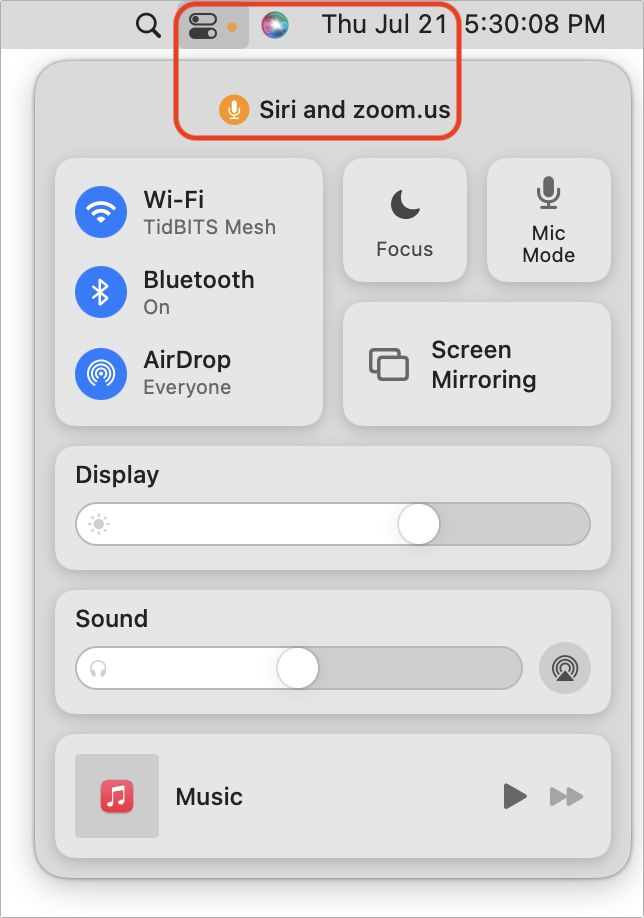
Have you noticed a little orange dot next to the icon for Control Center on the menu bar in macOS 12 Monterey? (And if not, you can’t miss it now.) Apple added that dot to alert you that something is using the Mac’s microphone to listen to the room. Click the Control Center icon to see which apps are using the mic. In nearly all situations, it will be entirely innocuous: Siri needs to listen for the “Hey, Siri” trigger, as in the screenshot below, and the Zoom app needs microphone access to provide audio in a video call. But if you don’t recognize the app that’s listening, you’ll want to look into it to make sure there’s nothing creepy going on.
(Featured image by iStock.com/Mihajlo Maricic)
Recent Posts

Mar. 06, 2026
How to Find and Silence the Browser Tab That’s Playing Audio

Mar. 06, 2026
Losing Messages or Calls? Look in the Unknown Senders/Callers Filter

Mar. 06, 2026
iOS 26 Can AutoFill Credit Card Details

Mar. 06, 2026
Apple Refreshes Studio Display and Introduces Studio Display XDR

Mar. 06, 2026
Apple’s Focus Is Powerful but Unpredictable

Mar. 06, 2026
Why Cloud Storage Isn’t a Backup

Mar. 06, 2026
Apple Refreshes iPhone, iPad Air, and MacBook Lineups

Mar. 06, 2026
How Does the New MacBook Neo Compare to the MacBook Air?

Mar. 03, 2026
Tech Tips: Backups That Actually Save the Day

Feb. 06, 2026
Customize Folder Colors and Icons in macOS 26 Tahoe
View All Posts