

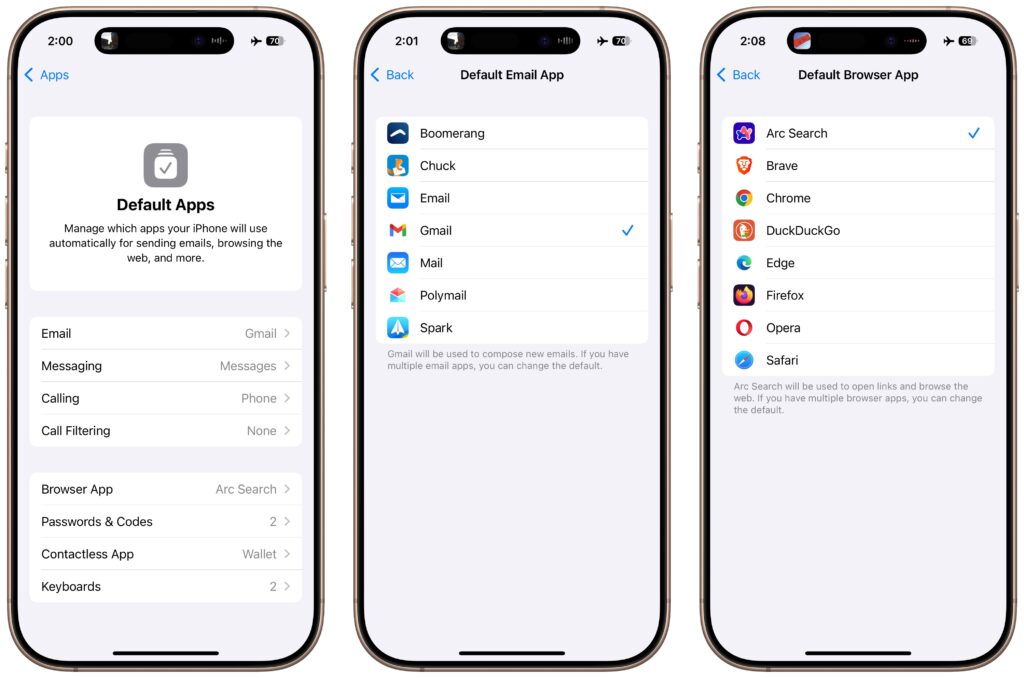
An unheralded feature in iOS 18.2 and iPadOS 18.2 helps you manage the default apps on your iPhone and iPad. A default app is one that opens automatically for a particular function, like opening a Web link or inserting a saved password. Previously, the only way to change a default app was within the settings for that app, but now you can go to Settings > Apps > Default Apps to see and set all your options in one place. The Calling and Messaging options are new in 18.2, but Apple hasn’t yet given any third-party apps permission to appear in those lists. This new screen isn’t that big of a deal, but we wanted to use it as a reminder that alternatives to Mail and Safari might better fit your needs.
(Featured image based on an original by iStock.com/Thicha Satapitanon)
Social Media: Many people don’t realize they can choose alternatives to Apple’s Mail and Safari on the iPhone and iPad. A new Default Apps screen simplifies reviewing your options and changing your defaults.
Recent Posts

Mar. 06, 2026
How to Find and Silence the Browser Tab That’s Playing Audio

Mar. 06, 2026
Losing Messages or Calls? Look in the Unknown Senders/Callers Filter

Mar. 06, 2026
iOS 26 Can AutoFill Credit Card Details

Mar. 06, 2026
Apple Refreshes Studio Display and Introduces Studio Display XDR

Mar. 06, 2026
Apple’s Focus Is Powerful but Unpredictable

Mar. 06, 2026
Why Cloud Storage Isn’t a Backup

Mar. 06, 2026
Apple Refreshes iPhone, iPad Air, and MacBook Lineups

Mar. 06, 2026
How Does the New MacBook Neo Compare to the MacBook Air?

Mar. 03, 2026
Tech Tips: Backups That Actually Save the Day

Feb. 06, 2026
Customize Folder Colors and Icons in macOS 26 Tahoe
View All Posts