

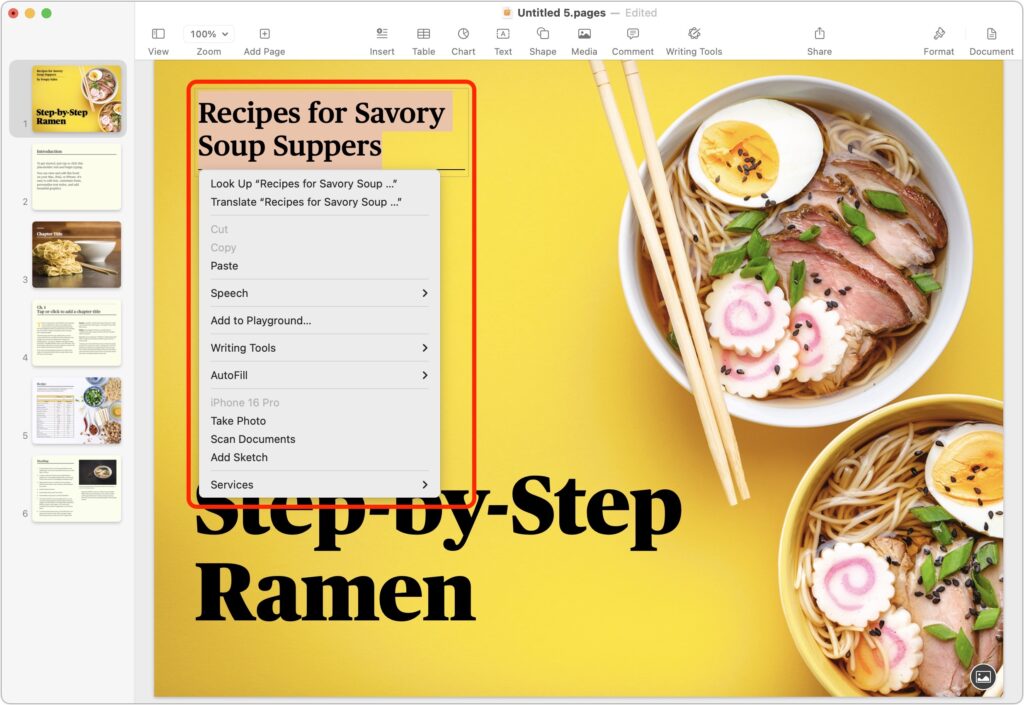
Those who prefer keeping their hands on the keyboard may appreciate Apple’s addition of a new shortcut in macOS 15 Sequoia. Instead of Control-clicking to open a contextual menu with commands to apply to the current selection, you can press Control-Return. Since it’s so new, it doesn’t work in some older apps or those that sidestep standard Apple frameworks, but it’s worth adding to your keyboard repertoire.
(Featured image by iStock.com/Milatas)
Social Media: macOS 15 Sequoia has a new way you can keep your hands on the keyboard. Press Control-Return to open contextual menus—no mouse required. Try it out and speed up your workflow on your Mac.
Recent Posts

Mar. 06, 2026
How to Find and Silence the Browser Tab That’s Playing Audio

Mar. 06, 2026
Losing Messages or Calls? Look in the Unknown Senders/Callers Filter

Mar. 06, 2026
iOS 26 Can AutoFill Credit Card Details

Mar. 06, 2026
Apple Refreshes Studio Display and Introduces Studio Display XDR

Mar. 06, 2026
Apple’s Focus Is Powerful but Unpredictable

Mar. 06, 2026
Why Cloud Storage Isn’t a Backup

Mar. 06, 2026
Apple Refreshes iPhone, iPad Air, and MacBook Lineups

Mar. 06, 2026
How Does the New MacBook Neo Compare to the MacBook Air?

Mar. 03, 2026
Tech Tips: Backups That Actually Save the Day

Feb. 06, 2026
Customize Folder Colors and Icons in macOS 26 Tahoe
View All Posts