

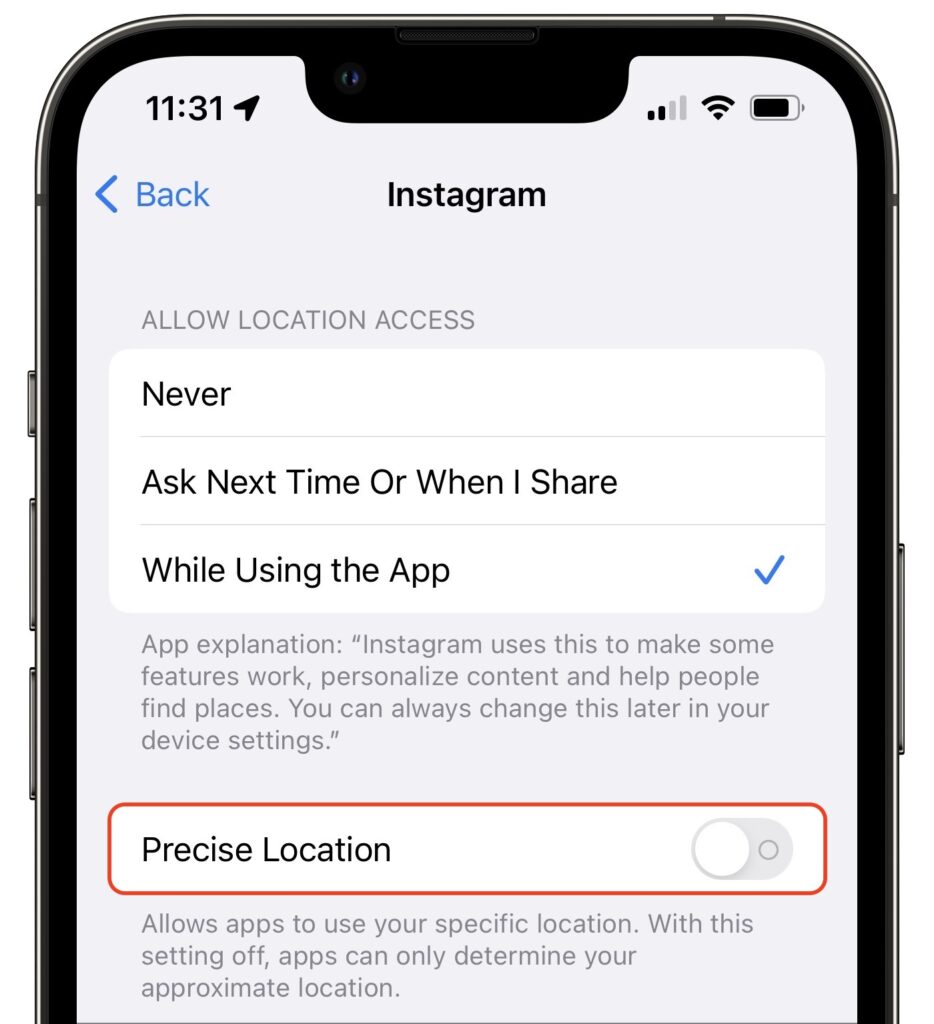
Most of the time, having your iPhone know precisely where you are is good. You want Maps to tell you exactly when to turn, not after you’ve passed an intersection. But too many apps abuse their users’ privacy. We strongly encourage you to stop using such apps entirely, but we acknowledge that it can be hard to give up apps that seem necessary for modern life. Barring that, you could prevent such apps from seeing your location at all, but even that isn’t always feasible. Since iOS 14, Apple has provided another compromise—you can prevent an app from seeing your precise location while still giving it your approximate whereabouts. Go to Settings > Privacy > Location Services, scroll down and tap the app in question, and disable Precise Location.
(Featured image by iStock.com/Melpomenem)
Recent Posts

Mar. 06, 2026
How to Find and Silence the Browser Tab That’s Playing Audio

Mar. 06, 2026
Losing Messages or Calls? Look in the Unknown Senders/Callers Filter

Mar. 06, 2026
iOS 26 Can AutoFill Credit Card Details

Mar. 06, 2026
Apple Refreshes Studio Display and Introduces Studio Display XDR

Mar. 06, 2026
Apple’s Focus Is Powerful but Unpredictable

Mar. 06, 2026
Why Cloud Storage Isn’t a Backup

Mar. 06, 2026
Apple Refreshes iPhone, iPad Air, and MacBook Lineups

Mar. 06, 2026
How Does the New MacBook Neo Compare to the MacBook Air?

Mar. 03, 2026
Tech Tips: Backups That Actually Save the Day

Feb. 06, 2026
Customize Folder Colors and Icons in macOS 26 Tahoe
View All Posts