

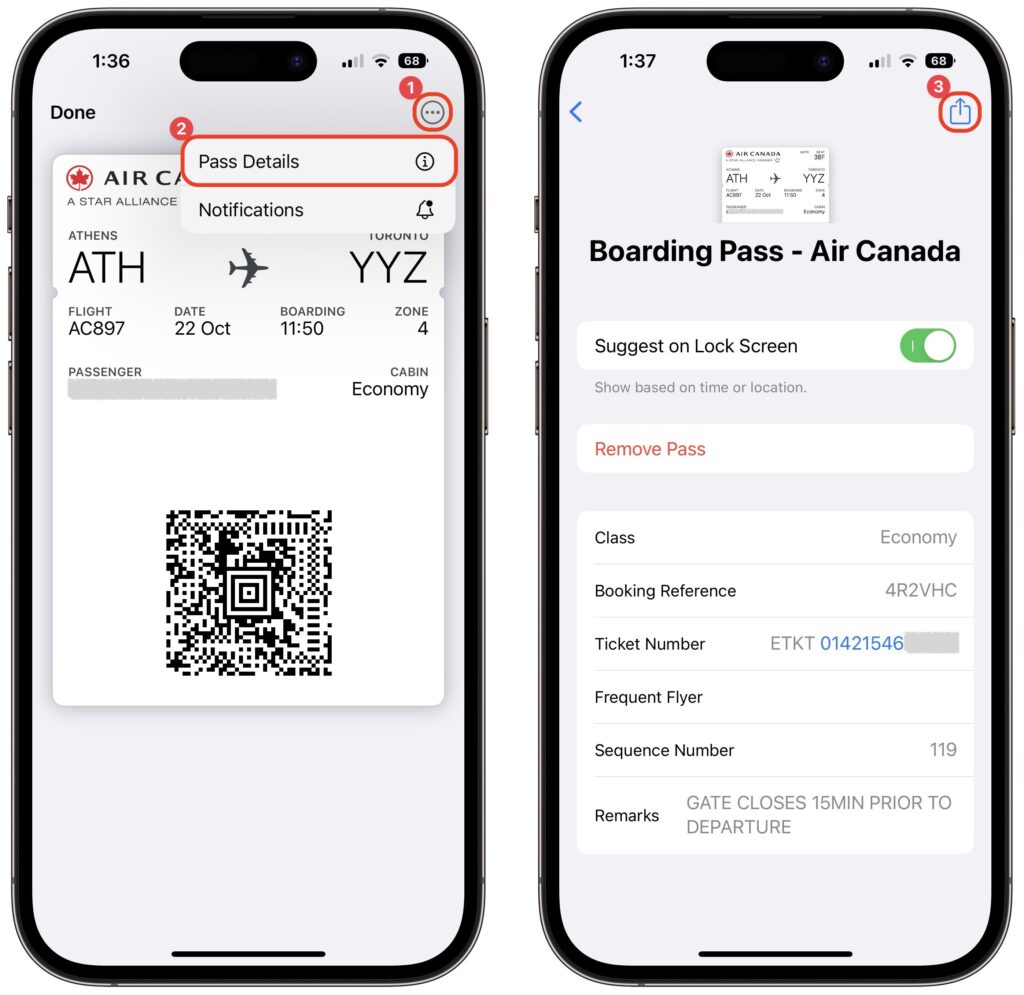
It’s common for one person in a family to handle booking airline tickets and thus to be in charge of checking in for the flight online and downloading boarding passes. If that’s you, what’s the best way to send each iPhone-wielding person in your family their own boarding pass? Rather than tussle with sharing the check-in confirmation email, add all the family boarding passes to Wallet on your iPhone. Then, for each person’s boarding pass, tap the ••• button ➊, tap Pass Details ➋, tap the share icon in the upper-right corner ➌, and share the pass via AirDrop or any other standard method. When the person receives it, they’ll be prompted to add the pass to their Wallet app.
(Featured image by iStock.com/IPGGutenbergUKLtd)
Recent Posts

Mar. 06, 2026
How to Find and Silence the Browser Tab That’s Playing Audio

Mar. 06, 2026
Losing Messages or Calls? Look in the Unknown Senders/Callers Filter

Mar. 06, 2026
iOS 26 Can AutoFill Credit Card Details

Mar. 06, 2026
Apple Refreshes Studio Display and Introduces Studio Display XDR

Mar. 06, 2026
Apple’s Focus Is Powerful but Unpredictable

Mar. 06, 2026
Why Cloud Storage Isn’t a Backup

Mar. 06, 2026
Apple Refreshes iPhone, iPad Air, and MacBook Lineups

Mar. 06, 2026
How Does the New MacBook Neo Compare to the MacBook Air?

Mar. 03, 2026
Tech Tips: Backups That Actually Save the Day

Feb. 06, 2026
Customize Folder Colors and Icons in macOS 26 Tahoe
View All Posts