

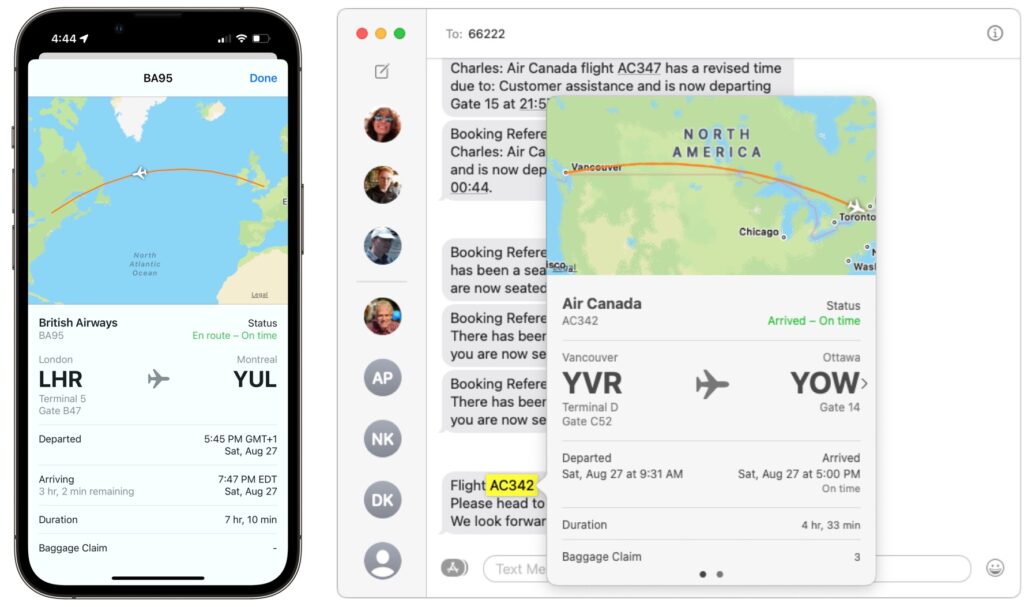
Next time you’re flying to visit your Apple-using family or friends, send them your flight number using Messages when you leave. Then they can easily track your flight in the air and see when you’re arriving. Just text them the flight number prefixed with the airline’s abbreviation, like AA for American Airlines, AC for Air Canada, BA for British Air, DL for Delta, or UA for United Airlines. If Messages recognizes the flight number, it will underline it to indicate that tapping or clicking will bring up the current flight information. This feature also helps you extract more information from a texted flight status update that an airline sends to you. If you know a flight number but don’t have it in Messages, you can get the same information on the Mac using Spotlight (press Command-Space). On an iPhone or iPad, use the Search feature (pull down on the Home screen).
(Featured image by iStock.com/SamAntonioPhotography)
Recent Posts

Mar. 06, 2026
How to Find and Silence the Browser Tab That’s Playing Audio

Mar. 06, 2026
Losing Messages or Calls? Look in the Unknown Senders/Callers Filter

Mar. 06, 2026
iOS 26 Can AutoFill Credit Card Details

Mar. 06, 2026
Apple Refreshes Studio Display and Introduces Studio Display XDR

Mar. 06, 2026
Apple’s Focus Is Powerful but Unpredictable

Mar. 06, 2026
Why Cloud Storage Isn’t a Backup

Mar. 06, 2026
Apple Refreshes iPhone, iPad Air, and MacBook Lineups

Mar. 06, 2026
How Does the New MacBook Neo Compare to the MacBook Air?

Mar. 03, 2026
Tech Tips: Backups That Actually Save the Day

Feb. 06, 2026
Customize Folder Colors and Icons in macOS 26 Tahoe
View All Posts