

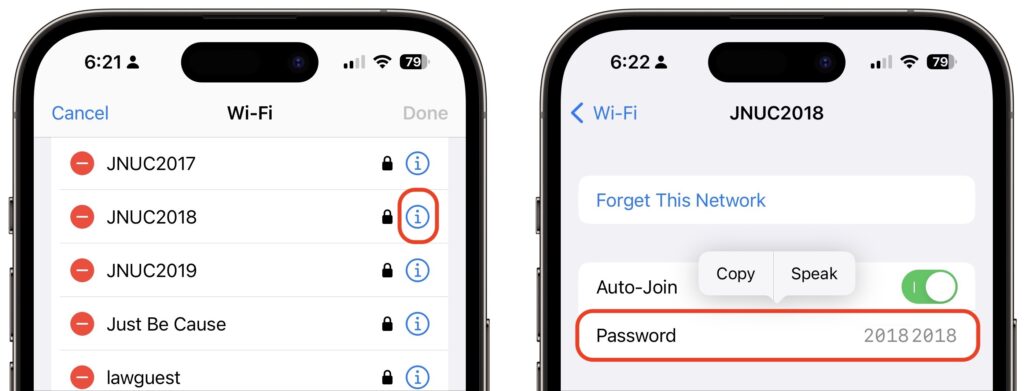
The iPhone and iPad have long allowed you to share Wi-Fi passwords with other nearby devices and people as long as they were in your Contacts list. But you couldn’t see those passwords, which is handy for sharing with non-Apple users and devices. In iOS 16 and iPadOS 16, you can now view and copy the stored Wi-Fi password for either the current network or any remembered network. In Settings > Wi-Fi, next to a network’s name (tap Edit at the top right to view stored networks), tap the blue information icon, tap Password, and authenticate to reveal the password. If desired, tap Copy to copy to the clipboard for pasting in another app, such as Mail or Messages.
(Featured image by iStock.com/denizbayram)
Recent Posts

Mar. 06, 2026
How to Find and Silence the Browser Tab That’s Playing Audio

Mar. 06, 2026
Losing Messages or Calls? Look in the Unknown Senders/Callers Filter

Mar. 06, 2026
iOS 26 Can AutoFill Credit Card Details

Mar. 06, 2026
Apple Refreshes Studio Display and Introduces Studio Display XDR

Mar. 06, 2026
Apple’s Focus Is Powerful but Unpredictable

Mar. 06, 2026
Why Cloud Storage Isn’t a Backup

Mar. 06, 2026
Apple Refreshes iPhone, iPad Air, and MacBook Lineups

Mar. 06, 2026
How Does the New MacBook Neo Compare to the MacBook Air?

Mar. 03, 2026
Tech Tips: Backups That Actually Save the Day

Feb. 06, 2026
Customize Folder Colors and Icons in macOS 26 Tahoe
View All Posts