

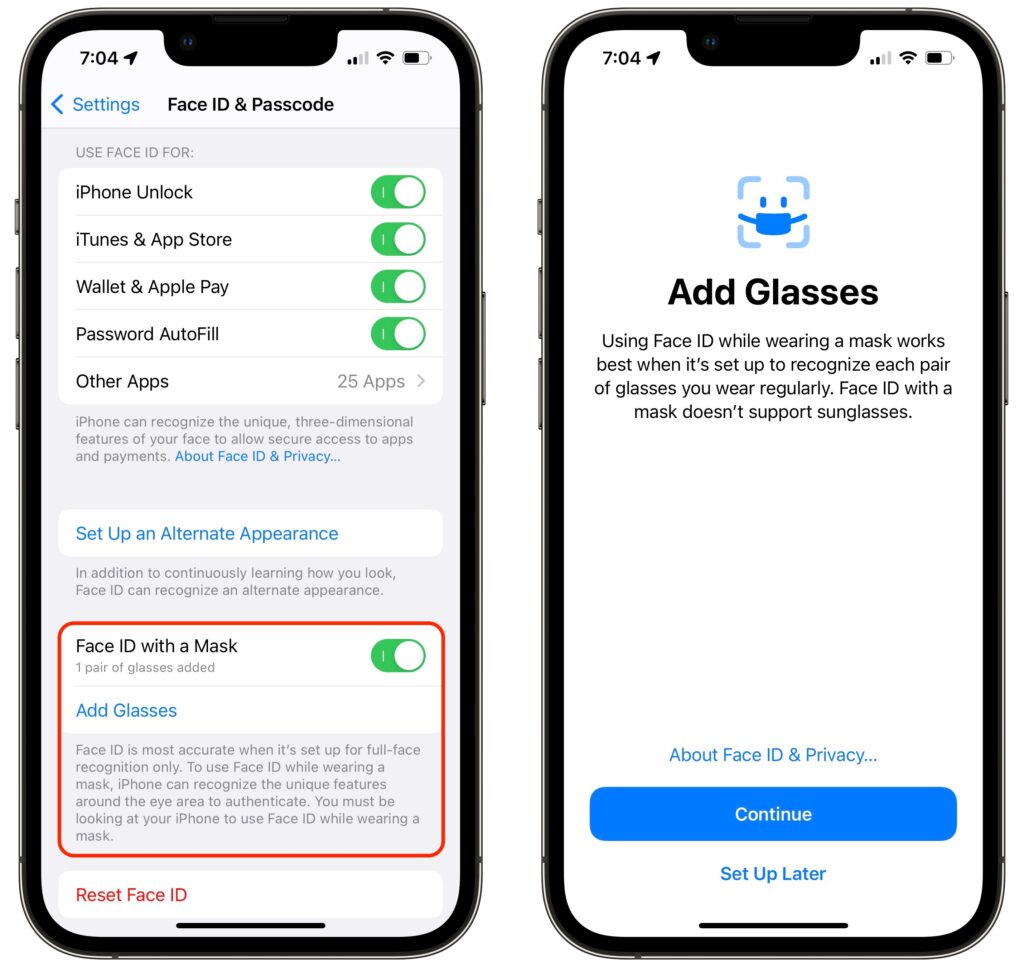
Shortly after the start of the COVID-19 pandemic, Apple made it so your Apple Watch could unlock your Face ID-enabled iPhone when you were wearing a mask. Starting in iOS 15.4, the company has taken the next step and enabled Face ID on the iPhone 12 and later to work even when you’re wearing a mask. If you didn’t already set up Face ID with a mask after updating to iOS 15.4, go to Settings > Face ID & Passcode and enable Face ID with a Mask. You’ll have to run through the Face ID training sequence again, and more than once if you sometimes wear glasses, but it’s quick and easy. Face ID may not work quite as well when you’re wearing a mask, and it doesn’t support sunglasses, but it’s way better than having to enter your passcode whenever you’re masked.
(Featured image by iStock.com/Prostock-Studio)
Recent Posts

Mar. 06, 2026
How to Find and Silence the Browser Tab That’s Playing Audio

Mar. 06, 2026
Losing Messages or Calls? Look in the Unknown Senders/Callers Filter

Mar. 06, 2026
iOS 26 Can AutoFill Credit Card Details

Mar. 06, 2026
Apple Refreshes Studio Display and Introduces Studio Display XDR

Mar. 06, 2026
Apple’s Focus Is Powerful but Unpredictable

Mar. 06, 2026
Why Cloud Storage Isn’t a Backup

Mar. 06, 2026
Apple Refreshes iPhone, iPad Air, and MacBook Lineups

Mar. 06, 2026
How Does the New MacBook Neo Compare to the MacBook Air?

Mar. 03, 2026
Tech Tips: Backups That Actually Save the Day

Feb. 06, 2026
Customize Folder Colors and Icons in macOS 26 Tahoe
View All Posts