

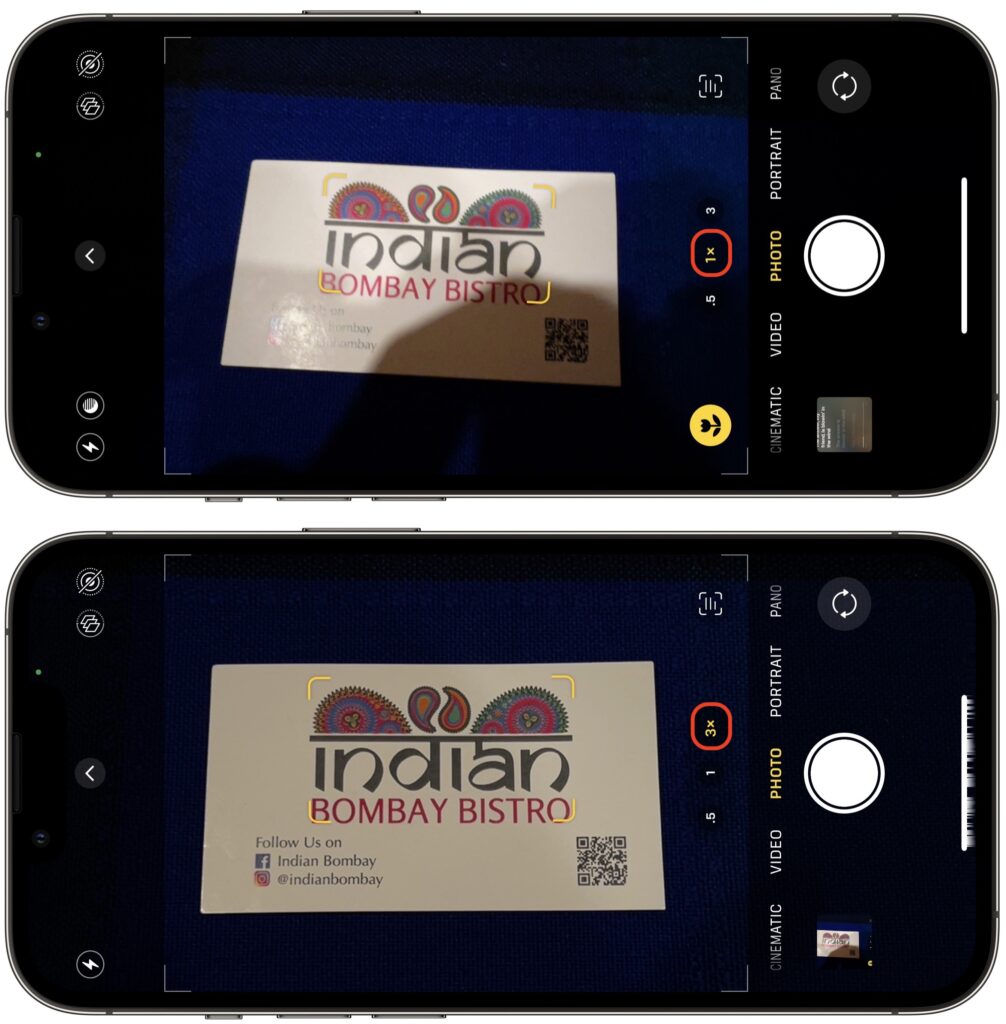
We increasingly need to take photos of documents—vaccination cards, driver licenses, passports, etc.—to submit for online verification. That’s often easier said than done, especially when taking a photo at night under lights that obscure the text with glare and shadows. Similarly, when photographing a screen to document a problem for tech support, it’s often difficult to capture it without a problematic reflection. For a possible solution, back up from the thing you’re photographing and use your iPhone’s zoom feature to enlarge the document or screen. The extra distance often lets you adjust the angle and positioning to prevent glare, shadows, and reflection.
(Featured image by Adam Engst)
Recent Posts

Mar. 06, 2026
How to Find and Silence the Browser Tab That’s Playing Audio

Mar. 06, 2026
Losing Messages or Calls? Look in the Unknown Senders/Callers Filter

Mar. 06, 2026
iOS 26 Can AutoFill Credit Card Details

Mar. 06, 2026
Apple Refreshes Studio Display and Introduces Studio Display XDR

Mar. 06, 2026
Apple’s Focus Is Powerful but Unpredictable

Mar. 06, 2026
Why Cloud Storage Isn’t a Backup

Mar. 06, 2026
Apple Refreshes iPhone, iPad Air, and MacBook Lineups

Mar. 06, 2026
How Does the New MacBook Neo Compare to the MacBook Air?

Mar. 03, 2026
Tech Tips: Backups That Actually Save the Day

Feb. 06, 2026
Customize Folder Colors and Icons in macOS 26 Tahoe
View All Posts