

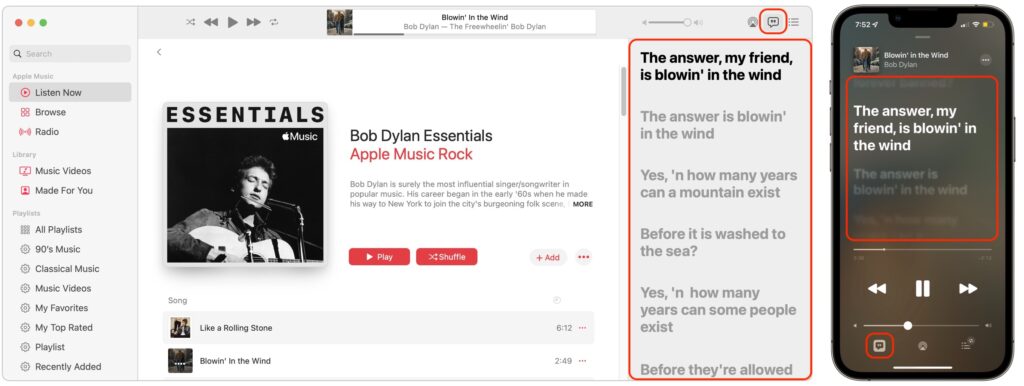
It’s often tough to figure out exactly what a singer is saying (which can lead to some amusing mistakes), but for many songs in Apple Music, you can bring up full lyrics in the Music app, regardless of which device you’re using. On the Mac, click the speech balloon button in the upper-right corner to display the lyrics pane on the right side of the window. On an iPhone, tap the playback controls at the bottom of the screen to bring up the Now Playing view, then tap the speech balloon button in the lower-left corner to show lyrics. Music on the iPad is similar to the iPhone, but the speech balloon button is on the right side. With many songs, the lyrics will scroll as the song plays, but with others, you’ll just get a static display. Either way, you’ll know that the ants, my friends, are not blowin’ in the wind.
(Featured image by iStock.com/Chattrawutt)
Recent Posts

Mar. 06, 2026
How to Find and Silence the Browser Tab That’s Playing Audio

Mar. 06, 2026
Losing Messages or Calls? Look in the Unknown Senders/Callers Filter

Mar. 06, 2026
iOS 26 Can AutoFill Credit Card Details

Mar. 06, 2026
Apple Refreshes Studio Display and Introduces Studio Display XDR

Mar. 06, 2026
Apple’s Focus Is Powerful but Unpredictable

Mar. 06, 2026
Why Cloud Storage Isn’t a Backup

Mar. 06, 2026
Apple Refreshes iPhone, iPad Air, and MacBook Lineups

Mar. 06, 2026
How Does the New MacBook Neo Compare to the MacBook Air?

Mar. 03, 2026
Tech Tips: Backups That Actually Save the Day

Feb. 06, 2026
Customize Folder Colors and Icons in macOS 26 Tahoe
View All Posts